Golden School: Mastering Varsity Typography Without the Common Pitfalls
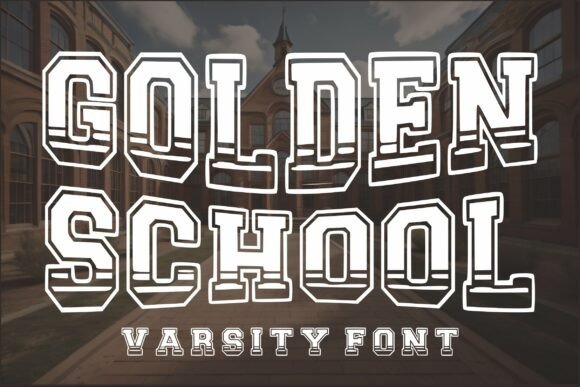
Golden School is a bold varsity display font that captures the authentic spirit of classic collegiate lettering and vintage athletic typography. Designed with strong block characters and distinctive layered outlines, this typeface delivers an immediate sense of tradition, energy, and institutional pride. For designers, marketers, and creators working on sports branding, university apparel, team logos, or retro-inspired merchandise, Golden School offers a shortcut to achieving that coveted nostalgic aesthetic. However, owning the font files is only the first step. The difference between a professional-grade design and an amateur attempt often lies in understanding how to leverage its specific structural features without falling into common typographic traps.
Many users are drawn to Golden School because it solves a specific visual problem: creating authoritative, athletic text without hand-drawing every letter. Yet, because it is a specialized display font, it behaves differently than standard sans-serifs or serifs. Misunderstanding its intended use case or technical limitations can lead to readability issues, production errors during cutting or printing, and designs that feel cluttered rather than classic. By addressing these frequent oversights early, you can ensure your projects maintain the high-quality presentation that varsity typography demands.
Avoiding Readability Issues in Display Settings
The most frequent mistake when using Golden School is treating it as a versatile workhorse rather than a specialized display tool. This font is engineered for impact at large sizes, such as headlines, jersey numbers, and poster titles. A common error occurs when designers attempt to use it for body copy, subheads, or small captions. At reduced sizes, the intricate multilayer outlines and heavy block forms can merge visually, creating muddy textures that are difficult to read. This not only diminishes the aesthetic appeal but also fails to communicate essential information effectively.
To avoid this, reserve Golden School strictly for primary focal points where the letterforms have room to breathe. Pair it with a clean, simple sans-serif for supporting text. This contrast enhances legibility and actually makes the varsity elements stand out more. If you find yourself reducing the font size below 24 points (depending on output resolution), it is a strong signal to switch to a complementary typeface. Remember that vintage athletic typography was designed to be seen from the stands, not read in a paragraph.
Navigating Multilayer Complexity in Production
One of the standout features of Golden School is its built-in multilayer outline style, which creates depth and dimension automatically. While this saves time compared to manually stacking effects, it introduces complexity for physical production. Users working with Cricut, Silhouette, or screen printing often overlook how these layers interact during fabrication. A frequent oversight is assuming all layers will cut or print cleanly at any scale. When scaled down for items like hat patches or small decals, the internal negative spaces within the layered outlines can become too thin for vinyl cutters to handle, leading to tearing or weeding nightmares.
Before sending a design to production, always test the smallest intended size. For vinyl applications, you may need to simplify the design by using only the base layer or welding specific elements to prevent fragile connections. In digital workflows, ensure you understand how the OTF and TTF formats handle these layers. Some software requires you to manually adjust color mapping for each layer, while others apply default styling. Checking this behavior during the drafting phase prevents costly reprints and wasted materials later.
Respecting Spacing and Kerning Norms
Varsity fonts like Golden School possess unique metric characteristics that differ significantly from modern geometric typefaces. A prevalent misunderstanding is relying solely on automatic kerning or tracking settings. Because these block characters are designed to interlock or sit tightly together to mimic felt lettering, default spacing in design software can sometimes appear too loose or uneven. Conversely, tightening the tracking indiscriminately can cause the decorative serifs and slab edges to collide awkwardly.
The better approach is to optically adjust spacing based on the specific word shape. Look at the negative space between letters rather than just the distance between anchor points. Words with diagonal strokes (like "A" or "V") next to vertical stems often require manual tucking to maintain consistent visual density. Taking an extra five minutes to refine kerning ensures the text block feels solid and cohesive, which is essential for conveying the strength associated with athletic branding. Automated tools are helpful starting points, but they rarely perfect the nuanced geometry of retro school aesthetics.
Checking Licensing and Format Compatibility
Before purchasing or downloading Golden School, verify that the included formats align with your workflow and that the license covers your intended use. While the package includes both OTF and TTF formats, beginners often grab whichever file appears first without considering compatibility. OTF (OpenType) generally supports advanced typographic features and smoother rendering in professional software like Adobe Illustrator or Affinity Designer. TTF (TrueType) is often more compatible with basic crafting software and older systems. Using the wrong format can result in missing glyphs or rendering glitches that look like font errors but are actually compatibility mismatches.
Additionally, confirm the character set meets your needs before committing to a project. Golden School includes uppercase letters, numbers, and punctuation, which covers most varsity applications. However, if your project requires extensive lowercase text, special currency symbols, or accented characters for international teams, you must verify their inclusion beforehand. Discovering mid-project that a necessary glyph is missing forces awkward workarounds or complete redesigns. Always review the specimen sheet and licensing terms specifically for commercial merchandise if you plan to sell apparel or products featuring the typeface.
Maintaining Authenticity in Retro Design
While Golden School provides the correct structural foundation for vintage athletic design, authenticity comes from appropriate application. A subtle but impactful mistake is pairing this historically grounded font with overly modern, glossy, or neon effects that clash with its heritage. The font’s personality is rooted in wool, felt, leather, and matte paint. Applying metallic gradients or futuristic glows can create cognitive dissonance that undermines the nostalgic value.
Instead, lean into textures and colors that complement the era the font evokes. Muted earth tones, cream offsets, and subtle grain overlays enhance the varsity feel without overpowering the letterforms. When designing for modern audiences who appreciate retro aesthetics, the goal is respectful adaptation rather than caricature. Use Golden School as the anchor of authenticity, and let your supporting design choices reinforce that narrative. This thoughtful alignment between typography and visual context is what separates professional branding from generic template usage.
Ultimately, Golden School is a powerful asset for anyone creating sports-related or nostalgia-driven content. Its bold presence and layered construction offer significant creative advantages when used correctly. By avoiding common pitfalls regarding scale, production preparation, spacing, and stylistic consistency, you ensure that your designs honor the tradition of collegiate lettering while meeting contemporary standards of quality and usability. Whether you are crafting a championship banner, a boutique apparel line, or a spirited social media graphic, mindful application of this typeface will yield results that are both visually striking and professionally executed.