Brother Outline Font: Bold Varsity Style for Modern Design
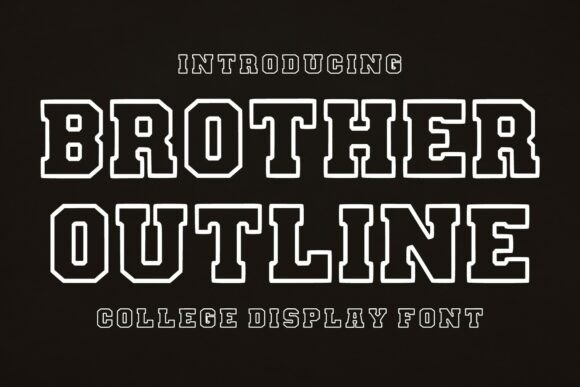
Typography carries weight beyond the literal meaning of words. When you select a typeface, you are choosing a voice, a history, and an immediate emotional response. Brother Outline captures a specific cultural moment that has transcended its origins to become a staple in contemporary graphic design. This bold, varsity-style display font features classic collegiate letterforms with a strong outline design that commands attention without screaming. It bridges the gap between nostalgic athletics and modern streetwear aesthetics, offering designers a tool that feels both established and fresh.
What makes Brother Outline particularly useful is its structural integrity. Many novelty fonts sacrifice legibility for style, but this typeface maintains excellent readability even at smaller display sizes. The outlined nature of the glyphs creates natural negative space, allowing for versatile color treatments and layering opportunities that solid fonts cannot achieve. Whether you are designing for a university alumni association or an independent coffee roaster, the font provides a professional varsity aesthetic that grounds your project in tradition while leaving ample room for creative interpretation.
Defining the Varsity Aesthetic in Contemporary Contexts
The "varsity" look is often pigeonholed as strictly sports-related, but Brother Outline demonstrates how athletic typography can function in broader commercial and artistic contexts. The font’s geometry is rooted in traditional block lettering used on mid-century university banners and team jerseys. However, the execution is clean and refined, stripping away unnecessary grit to leave a polished silhouette. This refinement allows the font to work in environments where a distressed or overly aggressive sports font might feel out of place.
For marketers and brand strategists, this distinction matters. You might be tasked with rebranding a tech startup that wants to convey teamwork and legacy, or designing packaging for a craft brewery emphasizing local heritage. In these scenarios, Brother Outline acts as a visual shorthand for community and excellence. It suggests institutional quality without requiring the viewer to have any actual affiliation with a school. The key to successful application lies in treating the font as a design element rather than just text. Because the letters are outlined, they interact dynamically with backgrounds, textures, and adjacent graphics, making them ideal for posters, merchandise, and digital headers where visual hierarchy is paramount.
Strategic Applications Across Industries
Different audiences require different tonal adjustments, even when using the same foundational typeface. Understanding how to adapt Brother Outline for specific sectors ensures your design remains relevant and effective.
- Sports and Athletics: This is the most direct application. Use the font for jersey numbers, scoreboard graphics, and championship merchandise. To keep it modern, pair it with minimalist sans-serif body copy and avoid cluttering the layout with excessive textures. Let the clean lines of the font speak to professionalism and performance.
- Fashion and Apparel: Streetwear and vintage-inspired clothing lines rely heavily on collegiate typography. Here, Brother Outline works best when scaled up significantly. Consider using it for chest prints on hoodies or back prints on tees. Experiment with fill colors that contrast sharply with the garment fabric, or leave the center transparent to let the shirt color show through for a subtle, integrated look.
- Education and Institutional Branding: Schools and educational nonprofits can use this font to evoke spirit and pride without looking dated. It is perfect for event signage, fundraising campaigns, and orientation materials. Pair it with academic serif fonts for body text to balance the energetic display face with scholarly credibility.
- Hospitality and Lifestyle: Bars, restaurants, and lifestyle brands often use varsity fonts to create a sense of belonging or neighborhood identity. In this context, soften the athletic edge by using warmer color palettes like creams, forest greens, or muted golds. The font becomes less about competition and more about gathering and tradition.
Maximizing Readability and Visual Hierarchy
A common pitfall with outline fonts is poor contrast management. Because Brother Outline relies on stroke definition rather than solid mass, it requires careful consideration of background complexity. Placing this font over a busy photograph or intricate pattern can cause the letterforms to vibrate visually or disappear entirely. To maintain clarity, always ensure there is sufficient separation between the font strokes and the background elements.
If you must place text over an image, consider adding a solid drop shadow or a subtle glow behind the letters to lift them off the page. Alternatively, use a semi-transparent shape behind the text block to create a dedicated reading zone. For headlines, Brother Outline shines when given breathing room. Tight tracking can sometimes cause the outlines to merge, creating muddy shapes. Slightly increasing the letter spacing often enhances legibility and adds a premium, architectural feel to the composition. Remember that display fonts are meant to be seen from a distance or at a glance; if the viewer has to squint to decipher the message, the stylistic choice has failed its functional purpose.
Creative Variations and Styling Techniques
The outlined structure of Brother Outline invites customization that goes beyond simple color changes. Designers can treat the interior and exterior of the letterforms as separate canvas areas. This duality opens up numerous styling possibilities that can make standard projects feel bespoke.
- Dual-Tone Colorways: Assign one color to the stroke and a contrasting color to the fill. This technique adds depth and dimension, making flat designs appear more tactile. High-contrast combinations like navy stroke with white fill read as classic, while neon stroke with black fill leans into cyberpunk or retro-futurism.
- Texture Masking: Use the font as a clipping mask to reveal textures, gradients, or images within the letterforms. A halftone pattern inside the letters can reinforce a vintage print aesthetic, while a metallic gradient can elevate luxury branding. Ensure the texture has enough variation to remain visible against the outline stroke.
- Layered Typography: Stack Brother Outline over a solid-weight version of itself (if available) or a complementary bold sans-serif. Offset the layers slightly to create a 3D extrusion effect or a misregistered print look. This adds kinetic energy to static designs and works exceptionally well for dynamic social media graphics.
- Selective Fills: Leave some letters outlined and others filled solid within the same word or phrase. This breaks up the visual rhythm and draws the eye to specific keywords. It is an effective way to emphasize action verbs or brand names within a longer headline.
Pairing and Layout Considerations
Brother Outline is a protagonist; it demands center stage. When building a typographic system around it, choose supporting typefaces that defer to its personality rather than competing with it. Avoid other decorative or highly stylized display fonts in the same layout. Instead, opt for neutral, geometric sans-serifs or clean monospaced fonts for subheads and body copy. These quieter companions provide necessary contrast and ensure the information hierarchy remains intuitive.
In terms of layout, align the font’s inherent geometry with your grid system. The structured, rectangular nature of the letterforms pairs well with rigid, modular grids. Center alignment often reinforces the symmetrical, badge-like quality of varsity typography, making it ideal for logos and emblems. However, left-aligned settings can modernize the look, especially when combined with asymmetrical imagery and generous whitespace. Always test your designs at multiple scales. What reads clearly on a desktop monitor may lose definition on a mobile screen or when printed small on a tag. Brother Outline is robust, but respecting its technical limitations ensures your creative vision translates effectively across all mediums.