Baby Beach: Using Handwritten Fonts with Intention and Clarity
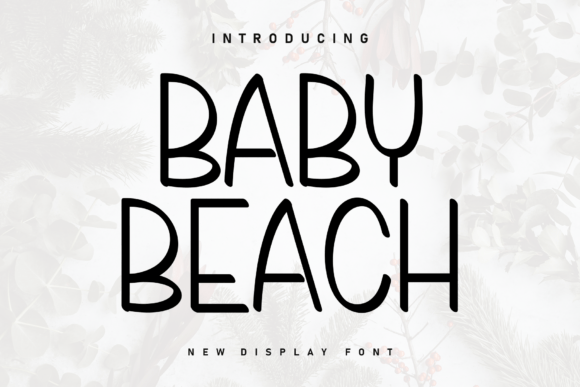
Baby Beach is a charming handwritten font filled with a sense of heartfelt perfection. Its smooth strokes and organic lines evoke a relaxed atmosphere, making it perfect for a variety of design projects. Whether used for branding, invitations, or social media graphics, this typeface offers a warmth that standard sans-serifs simply cannot replicate. However, the very qualities that make Baby Beach appealing are also what make it challenging to use effectively. Many designers and business owners fall in love with the aesthetic on a preview screen, only to find that the font creates readability issues or brand inconsistency when applied to real-world materials.
The goal of using a script or handwritten typeface should always be communication first and decoration second. When we prioritize style over legibility, we risk alienating the audience we are trying to connect with. Understanding the specific limitations and strengths of Baby Beach will help you avoid common pitfalls and ensure your designs look professional rather than amateurish.
The Readability Trap in Digital Environments
One of the most frequent mistakes occurs when creators use Baby Beach for body text or small-scale digital applications. Because this font mimics natural handwriting with varying stroke widths and organic connections, it requires significant visual processing power from the reader. On a large wedding invitation or a bold Instagram story background, this texture is beautiful. On a website sidebar, mobile navigation menu, or product description, it becomes an accessibility barrier.
When text is difficult to read, users do not struggle through it; they simply leave. This directly impacts bounce rates, conversion metrics, and overall user satisfaction. A better approach is to treat Baby Beach strictly as a display font. Use it for headlines, logos, pull quotes, or short call-to-action buttons where the text size can remain large. For all supporting content, pair it with a clean, highly legible sans-serif or serif typeface. This contrast not only solves the readability issue but actually makes the Baby Beach elements stand out more effectively by providing visual breathing room.
Overlooking Licensing for Commercial Use
Another critical oversight involves assuming that because a font feels personal or casual, it is free for commercial use. Baby Beach is often available on various download platforms, but licensing terms vary significantly between personal and commercial applications. Using a personally licensed version for a client’s rebrand, a monetized YouTube channel, or merchandise intended for sale is a legal risk that can result in takedown notices or financial penalties.
Before downloading or purchasing, always verify the specific license agreement. Look for clear language regarding "commercial use," "web embedding," and "app usage." If you are a freelancer designing for a client, ensure the license covers their specific business needs, not just your own portfolio use. Investing in the correct commercial license upfront is far less expensive than rebranding later due to compliance issues. Furthermore, legitimate licenses often come with better file formats and customer support, ensuring you have access to OpenType features that improve the font's performance.
Mismanaging Spacing and Kerning
Handwritten fonts like Baby Beach are designed with specific letter connections in mind. A common error is manually adjusting kerning (the space between individual letters) without understanding how the font was constructed. Tightening the spacing too much can cause overlapping strokes to merge into illegible blobs, while widening it can break the natural flow of the cursive connections, making the word look disjointed.
Trust the type designer’s original metrics unless there is a glaring optical error. If you must adjust spacing for a logo or headline, do so incrementally and test at multiple sizes. Additionally, check if the font includes alternate characters or ligatures. These built-in features are designed to handle awkward letter combinations that manual kerning cannot fix. Utilizing these OpenType features preserves the "heartfelt perfection" of the font while maintaining structural integrity.
Inconsistent Brand Voice Application
Baby Beach carries a specific emotional weight: it is soft, nostalgic, and informal. Applying this font to industries or messages that require authority, urgency, or technical precision creates cognitive dissonance. For example, using this typeface for a law firm’s disclaimer, a medical warning label, or a high-tech B2B software interface sends mixed signals that undermine trust.
Evaluate your brand voice before selecting this typeface. Does your message align with the relaxed, organic vibe of Baby Beach? If your brand is edgy, corporate, or minimalist, this font may clash with your identity even if you personally like the aesthetic. A practical test is to place the font next to your existing brand assets. If it looks like it belongs to a different company entirely, it is likely the wrong choice regardless of its standalone beauty. Consistency builds recognition, and novelty fonts should support, not distract from, your core message.
Technical Checks Before Finalizing Your Design
To ensure Baby Beach performs well in your project, run through this practical checklist before publishing or printing:
- Test Cross-Platform Rendering: Web fonts can render differently across browsers and operating systems. Always test Baby Beach on actual devices, not just in your design software, to ensure stroke details remain crisp.
- Verify Language Support: If your project includes non-English text or special characters, confirm the font includes necessary glyphs. Missing accented characters often default to a mismatched system font, breaking the visual harmony.
- Check Print Legibility: Screen resolution differs from ink spread. Print a physical proof at actual size to ensure thin strokes do not disappear or bleed excessively on paper.
- Assess Color Contrast: Handwritten fonts often have thinner strokes than block letters. Ensure your color combination meets WCAG accessibility standards, as low contrast affects scripts more severely than bold typefaces.
Making Informed Typography Decisions
Baby Beach is a wonderful tool when used with restraint and awareness. Its ability to add human touch to digital spaces is valuable, but only when balanced against functional requirements. By avoiding the temptation to overuse it, respecting licensing boundaries, preserving proper spacing, and aligning it with an appropriate brand voice, you transform it from a decorative novelty into a strategic design asset.
Remember that good typography is invisible to the end user; they should feel the emotion and absorb the message without noticing the font itself. When you approach Baby Beach with this mindset, you create designs that are not only aesthetically pleasing but also effective, accessible, and professionally sound. Take the time to test, pair, and validate your choices, and the results will reflect both heartfelt creativity and thoughtful execution.